Nederlands
Iedere dag bieden wij GRATIS software met licentie waarvoor je normaliter moet betalen!

$100
VERSTREKEN
Giveaway of the day — 100 Professional Font Bundle
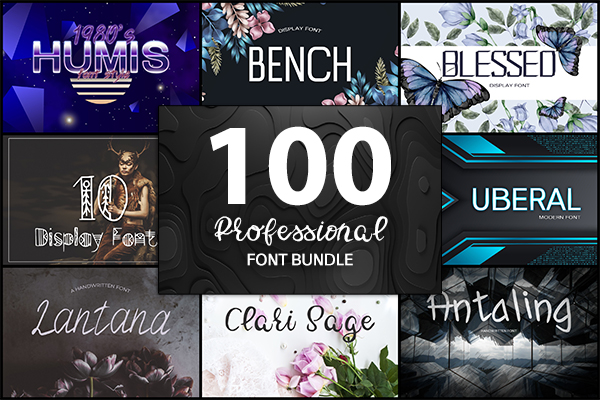
Het prachtige lettertypepakket met een unieke, gedetailleerde en handgemaakte look!
$100
VERSTREKEN
Waarderingscijfer:
85
Reactie inzenden
100 Professional Font Bundle werd aangeboden als een giveaway op 21 oktober 2020
Vandaag Giveaway of the Day

Apeaksoft WhatsApp Transfer is professionele software voor gegevensoverdracht.

let op: Programma archief bevat alleen tekstbestand met de downloadinstructies!
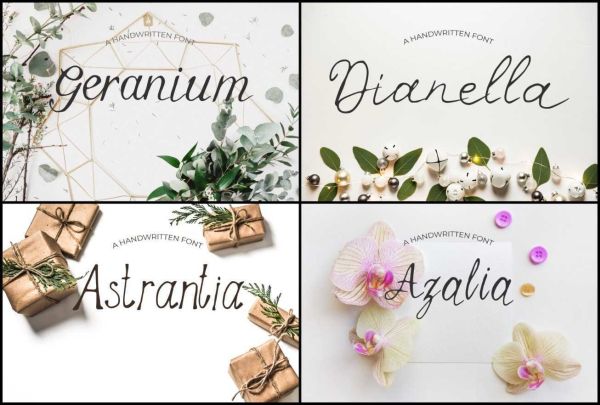
Het is een prachtig lettertypepakket met een unieke, gedetailleerde en handgemaakte look. Deze lettertypen zien er geweldig uit in hoofdletters met een brede ruimte als je wilt proberen een stijlvolle look of mooi op zichzelf in de hoofdstad en kleine letters voor iets volledig tijdloos. Perfect voor prachtige logo ' s, displays, headers, uitnodigingen, opslaan van de data, bruiloften, titels, web lay-outs, en branding, enz.
The current text is the result of machine translation. You can help us improve it.
Systeemvereisten:
Desktop
Uitgever:
Eldamar StudioWebsite:
https://eldamar-studio.com/product/650-professional-font-bundle/Bestandsgrootte:
5.6 MB (final bundle size)
Licence details:
Lifetime
Prijs:
$100
GIVEAWAY download basket

Developed by WordWeb Software

Automatically and quickly solve all kinds of equations.

Developed by Bolide Software

Developed by Fonlow IT
iPhone dagaanbiedingen »

$3.99 ➞ vandaag gratis

$1.99 ➞ vandaag gratis
Get this special numpad keyboard to enter numbers with ease in any app on your iPhone or iPad.
$0.49 ➞ vandaag gratis

Get access to over 220 questions and answers to help you prepare for the Bennett mechanical comprehension test.
$4.99 ➞ vandaag gratis
PDF2JPG is the ultimate solution for converting PDF documents into high-quality JPG images quickly and easily.
$0.99 ➞ vandaag gratis
Android dagaanbiedingen »

If you are a true Idle Tower Defense fan, this TD strategy game can't be missed!
$0.99 ➞ vandaag gratis

$1.49 ➞ vandaag gratis

$1.49 ➞ vandaag gratis

This is a unique circle icon pack with Squid's tentacles inspired design on the bottom.
$1.49 ➞ vandaag gratis

$1.49 ➞ vandaag gratis
Reactie op 100 Professional Font Bundle
Please add a comment explaining the reason behind your vote.
I would say don't be in a hurry to install all of these fonts without looking at them all. I find few - if any - that suit my purpose. Look before you leap, or you'll end up with so many fonts in your library that it will be a real chore to scroll through anything in the library.
Save | Cancel
Peter, I agree. The samples on their webpage don't inspire me to download this. I hate having too many fonts especially when the fonts are so similar to each-other.
Save | Cancel
Just been browsing through all the fonts, - not one single font supports national special characters...
So if you need fonts with national special characters (which we do in Denmark and in a lot other countries), then don't spend time to download these fonts.
Save | Cancel
Images of the fonts and their associated glyphs and language support would be useful. Images also show the quality level of the font being offered. Lack of language support instructions or glyph sets suggests these are only samples and not fully functional font sets.
Some indication of licensing would be useful. It’s nice to have OTF, TTF and WOFF formats, but without full licensing they are useless – there is no license included with the fonts, so no indication of legality for use. Fonts cannot be embedded in PDFs or used in Adobe/Photoshop projects without correct legal licensing.
The fonts offered here today come in a standard zip file with no wrapper so can be installed whenever needed/wanted. You may not want to overload system fonts with all these.
Just my 2 cents, but I have purchased and downloaded 1000’s of fonts. I suggest you use a font viewer to examine these and decide if you want to install them. Decide if they are worth the slowdown to your system? Every installed font slows your system down on startup, fewer fonts’ quicker start.
Save | Cancel
Please inform how and WHERE on Windows to install all those fonts?
Save | Cancel
Bambi, with fonts you're better off installing just those you'll find useful, to avoid ending up with way too many to cope with as I have, which you can do by...
Double-click the font file, it'll open the previewer. There is an install button in the previewer, but I've found that sometimes results in the font not appearing in apps, so I would suggest instead right-clicking the font file and clicking "Install for all users". This installs them to the requisite folder in Windows.
Hope this helps
Save | Cancel