Iedere dag bieden wij GRATIS software met licentie waarvoor je normaliter moet betalen!
Giveaway of the day — DVDFab Media Player 2.4.3 (Win and Mac)
DVDFab Media Player 2.4.3 (Win and Mac) werd aangeboden als een giveaway op 18 september 2014

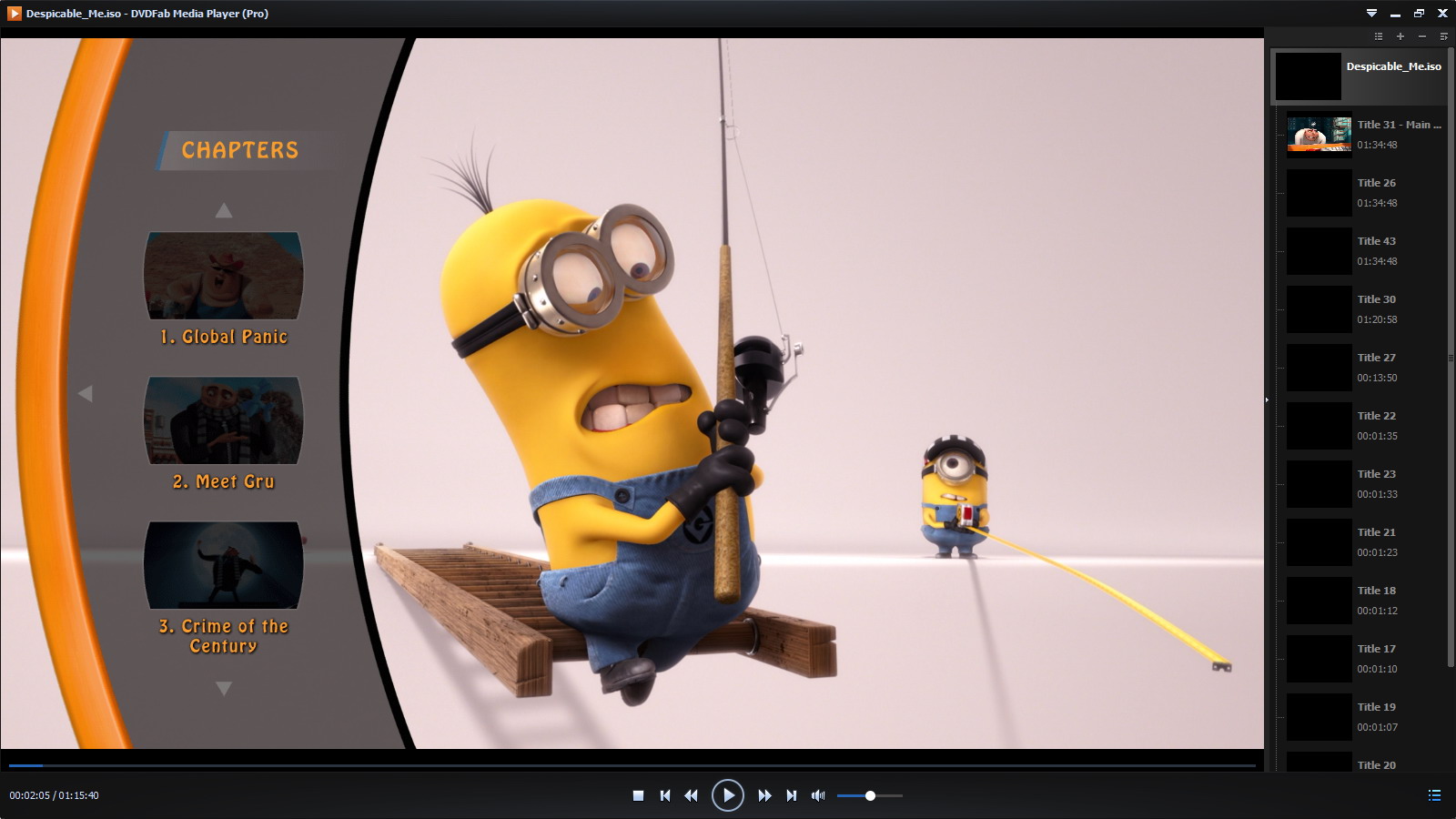
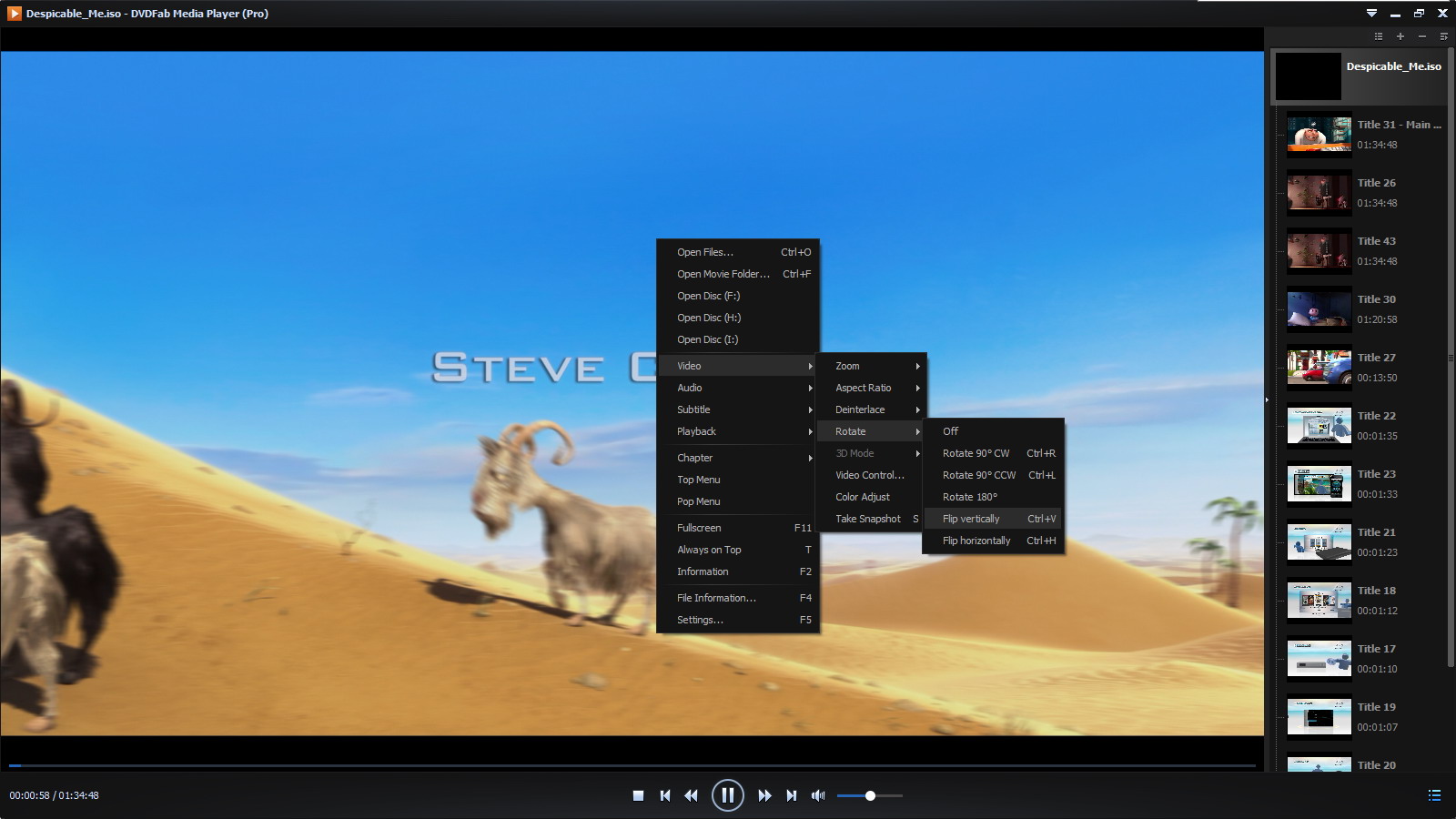
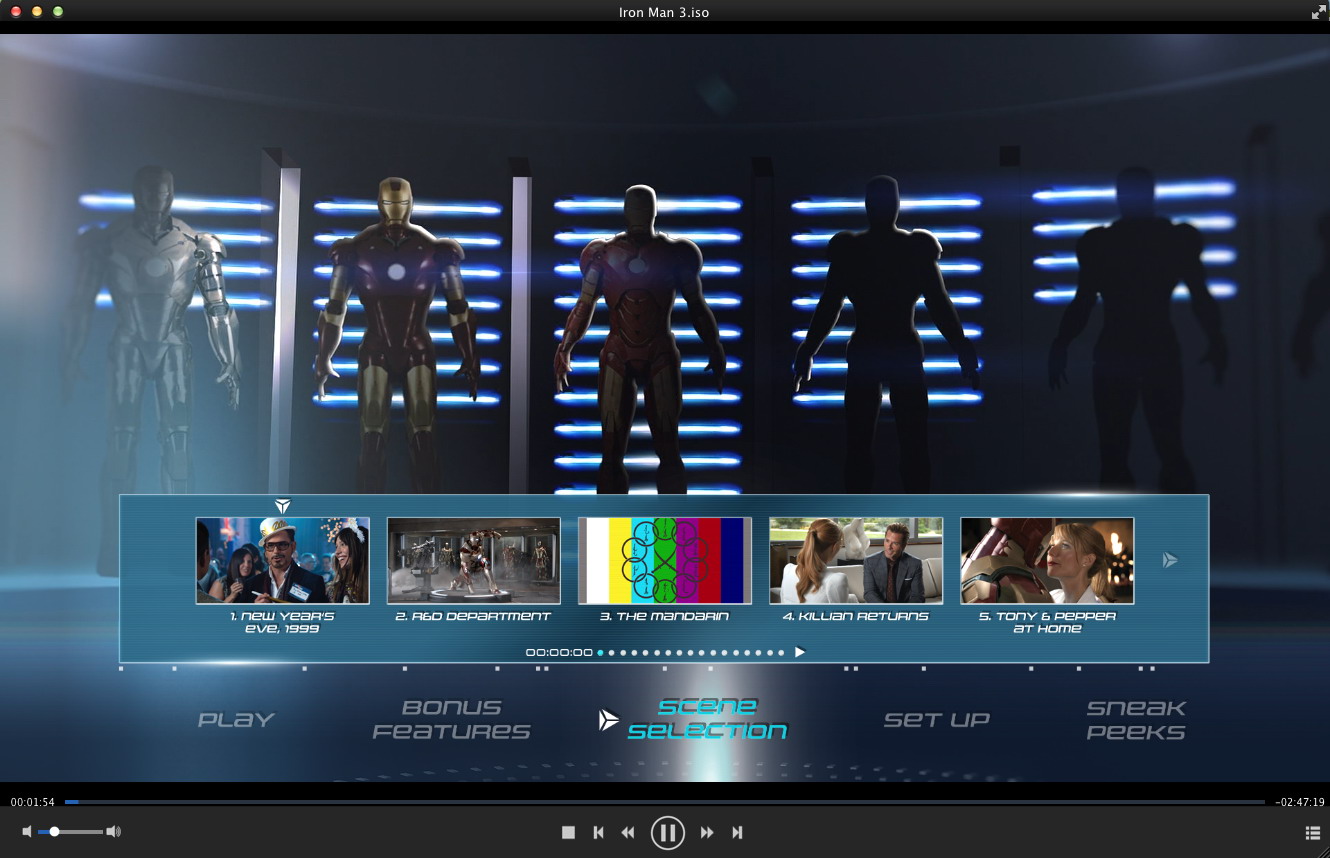
DVDFab Media Player biedt ‘s werelds beste DVD/Blu-ray/video speler voor Windows/Mac OS X. Met features als Blu-ray menu ondersteuning en HEVC (H.265)/UHD (Ultra High Definition)/4K afspelen, is je multimedia belevenis thuis niet veel minder dan die in de bioscoop!
Belangrijkste features:
- Afspelen DVD/Blu-ray ISO-bestanden en mappen;
- Afspelen HEVC (H.265), UHD en 4K video's;
- Auto-afspelen van de volgende aflevering van een tv-serie;
- Meerdere sets met mooie skins;
- Video's 90° met de klok mee of tegen de klok in draaien;
- Meerdere titels aan een afspeellijst toevoegen;
- Uitzonderlijk lichtgewicht en gebruikersvriendelijk.
Gebruikers van een Mac OS kunnen dit bestand downloaden (27.5 MB).
Opmerking: dit programma beschikt over een licentie voor een jaar.
The current text is the result of machine translation. You can help us improve it.
Systeemvereisten:
Windows XP or later; Mac OS X 10.6 or later
Uitgever:
Fengtao Software Inc.Website:
http://www.dvdfab.cn/media-player.htmBestandsgrootte:
22.5 MB (for Win)
Prijs:
$49.00
GIVEAWAY download basket




Reactie op DVDFab Media Player 2.4.3 (Win and Mac)
Please add a comment explaining the reason behind your vote.

Installed and registered with problems on a Win 8.1.2 Pro 64 bit system. Problems to receive the license code on their web-side.
An installed virus software for test purposes (360 Total Security) detects a Trojan in the installer:
http://www1.xup.to/exec/ximg.php?fid=59670708
I installed anyhow on my virtual system without fear ;-),hoping that this is a false positive.
A Chinese company from Bejing with address&phone Fengtao Software Inc., founded in Aug, 2003, been developed for more than 10 years, is a software producer who keeps going forward and aims to be world class with its powerful and professional DVD/Blu-ray/Video software and best services.
Keep in mind, that this is a one years license! I think, this means free updates during this year. Am I right???
A elegant black interface opens, you select your disk or your Video folder. You choose either the video files, the folder or the disk.
The interface is intuitive and easy to use. Three different skins to choose, hardware acceleration for VC-1, H264 and MPEG-2 codecs: software, DXVA and Intel Quick Sync. Selectable region code for BlueRay.
Disable the "Check for Updates".
One of the many players, one of the good ones. You will have no problems playing your media files in the next year.
Uninstalled via reboot. I still do not collect media players.

Another limited "free" program. I also like always-be-free media players, my list can be:
VLC:
AVS Media Player: http://www.avs4you.com/AVS-Media-Player.aspx
Daplayer: http://daplayer.en.softonic.com/
BS. Player:http://www.bsplayer.com/
...
Why to install this when there are other freebies available like VLC, GOM Player and the likes. No need for this one.
#4: "Why to install this when there are other freebies available like VLC, GOM Player and the likes. No need for this one."
Because they do not handle the DRM on DVD & Blu-Ray discs, and out of all the players available, relatively few understand how to find & play the movie on a Blu-Ray disc. Also, with the DVDFab player & similar from companies like Leawo, a better comparison would be to the home theater & media center apps that offer a more remote friendly screen for [HD]TV viewing.
Because of their DRM capabilities these players are normally licensed for 1 year, with the higher priced option of a lifetime license. In that respect it's like security software, where you're not just paying for the software, but the continual development to make sure it does its job, since the player is expected to handle future DRM as well as what's out there today. DVDFab is more generous than other companies though, including a free year regardless of how many updates that year brings -- I've installed probably a dozen or more newer versions since the DVDFab player was on GOTD previously.
The DVDFab Player does face a lot of stiff competition, both from similar players like Leawo's, & players that license the DRM tech from the separate DVD & Blu-Ray organizations. Tang mentions PowerDVD -- perhaps a better link would be to their comparison page, since Cyberlink has 4 versions available, 3 that will play Blu-Ray. http://www.cyberlink.com/products/powerdvd-ultra/compare-versions_en_US.html Their cheapest Blu-Ray player is the Live version, which is subscription based [like the DVDFab & Leawo standard licenses] & priced at $45 per year.
Nero Platinum 2015 out today includes DVD & Blu-Ray playback, plus like PowerDVD 14 Ultra, includes apps & features geared to your cell or tablet. It's obviously too soon to say what Nero will sell for -- the last version was always on sale for between 50 & 100% off [free after MIR, often at Frys]. It lists for $130. Do note that Nero is not problem free, e.g. for a significant amount of time their 2014 player wouldn't work with AMD graphics hardware.
* * *
#8: "Same registration problem here. No box for the email."
Turn off Adblock. [as it turns out Owen, #20 1st suggested]
* * *
#9: "... As I remember some comments for video grabbing software some or all of these softwares generally contact their producer for every single medium to get the appropriate codec. I don’t know whether this happens with DVDFab Media Player, too...
And I would like to know whether DVDFab is the same enterprise as before DVDFab was getting in international trouble with its famous free grabbing software..."
Yes & yes.
It's more efficient to have the software call home than to constantly release updated versions -- though the software is still updated fairly often -- and it cuts down on the time it takes the player to start playing your disc, since I believe they store the DRM data for every *new* title one of their apps encounters, so while it may have taken 3-5 minutes the 1st time their software saw a title, from then on it's seconds.
The story on their trouble is that they were sued in NY by one of the companies selling a method of DRM to the Blu-Ray folks. They chose not to have a lawyer or anyone else there to defend themselves at the hearing. There was no judgement or verdict, but the judge did issue a ruling that for now forbids American companies from doing business with them & took away their .com domain. Long story short, what this all means to you is that if you have a US ip address you may have some difficulty getting their Blu-Ray copy or ripping software.
* * *
#22: "Had no problem at all with installation and activation on my Win 8.1/64 system. This is a great alternative to the horribly bloated Cyberlink software."
Depends on how you define bloat. If you mean does it take up a lot of disk space, then yes. If you mean does it have lots of effects on Windows, &/or includes lots of apps, then no.
humm
When you go to the page it doesn't seem to display completely.
If you use the left mouse you can drag it over text (from top or bottom) so as to read the whole page.
Then you'll see what the two dots are for. One is for selecting mac the other for selecting windows.
Then you put in your email address, but there is no button to press to continue or enter input.
HOWEVER what does work is the buy now button for a lifetime license.
iPhone dagaanbiedingen »





Android dagaanbiedingen »





PS Ootje Bedankt voor al! het goede wwerk en tips
De Groeten !
x@4
Save | Cancel
@4 Harm Jan Verweij e.a. “initialize failed.”Dit kan het gevolg zijn van het ontbreken van "dxva2.dll"in
C:\WINDOWS\System32\
Wat is dxva2.dll?
dxva2.dll is een DLL-bestand dat verantwoordelijk is voor component DirectX Video Acceleration 2.0 DLL in Windows-systemen
> Google...http://dllfiles.free.fr/dllfiles/dxva2.dll
Was bij mij het geval
Groetjes,x@4
Save | Cancel
"Opmerking: dit programma beschikt over een licentie voor een jaar."
Dit is dus geen Giveaway maar een probeeraway!
Hoort niet thuis op een weggeef site.
Groet,
Alex
Save | Cancel
Na installatie kreeg ik de mededeling: "initialize failed." Ik heb het later handmatig geprobeerd maar het programma weigert op te starten op mijn computer. Ik heb het inmiddels alweer verwijderd.
Save | Cancel
Goed begrijpen de verschillen tussen gratis en "pro"versie - Deze kan dus zonder "mounten" een iso aan en is de proversie. Ongetwijfeld verbeterd tav vorige versie. DvDFab maakt top spul, kan VM maar staat er hier bij mij "life" op.
Save | Cancel
De registratie pagina opent niet altijd even goed.
Met Internet Explorer loopt het bij mij in ieder geval wel:
Firefox:
https://dl.dropboxusercontent.com/u/10366431/_GOTD/DVDFabMediaPlayer243Win_20140918/Firefox32.png
and Internet Explorer 11
https://dl.dropboxusercontent.com/u/10366431/_GOTD/DVDFabMediaPlayer243Win_20140918/InternetExplorer11.png
Ootje
Save | Cancel
"DVDFab Media Player 2.4.3"
Het programma(GOTD-uitvoering) kan tot 15 sept 2015 gebruikt worden.
De registratie kan aangevraagd worden op(haarwas heeft geluk):
http://www.dvdfab.cn/media-player-giveaway.htm
Er dient wel aangegeven te worden of het voor Windows of voor de MAC is:
https://dl.dropboxusercontent.com/u/10366431/_GOTD/DVDFabMediaPlayer243Win_20140918/AanvraagCode.png
Tijdens de installatie kan er voor een taal gekozen worden, ook Nederlands, en een optie om mediabestanden te standaard koppelen aan dit programma.
Later kan dit ook nog geregeld worden bij het instellingenmenu:
https://dl.dropboxusercontent.com/u/10366431/_GOTD/DVDFabMediaPlayer243Win_20140918/TaalFiles.png
Via de mail komt een bestand binnen met de activatiecode en een link naar een site met uitleg over de activatie:
http://www.dvdfab.cn/how_to_register.htm?pid=player en gebruik methode 2:
In het kort:
* Open het opgehaalde bestand in kladblok/notepad of Word of een andere tekstverwerker.
* Selecteer de gehele tekst met bv "Ctrl+A" en kopieer.
* Plak deze tekst in het hoofdscherm onder Register/"Voer Activerings Code in" van het menuitem Opties(pijl omlaag)
https://dl.dropboxusercontent.com/u/10366431/_GOTD/DVDFabMediaPlayer243Win_20140918/Activering.png
In de titelregel zal het woord Gratis veranderen naar Pro; wel het programma even opnieuw starten.
Bij Instellingen kunnen nog een paar instellingen bekeken worden, zoals update:
https://dl.dropboxusercontent.com/u/10366431/_GOTD/DVDFabMediaPlayer243Win_20140918/Instellingen-1.png
Ook de manier van afspelen kan aangepast worden:
https://dl.dropboxusercontent.com/u/10366431/_GOTD/DVDFabMediaPlayer243Win_20140918/Instellingen-Speelmode.png
De andere instellingen, bv Hardware versnelling en ondertitels:
https://dl.dropboxusercontent.com/u/10366431/_GOTD/DVDFabMediaPlayer243Win_20140918/Instellingen-2.png
Of Regiocode, associatie met bestanden en snapshots:
https://dl.dropboxusercontent.com/u/10366431/_GOTD/DVDFabMediaPlayer243Win_20140918/Instellingen-3.png
Het programma is op deze Windows geen supersnelle starter, maar andere spelers zijn ook niet snel. Het afspelen van een voorbeeld loopt prima.
Met de rechtermuis zijn nog een paar zaken te bereiken, zoals een volledig scherm:
https://dl.dropboxusercontent.com/u/10366431/_GOTD/DVDFabMediaPlayer243Win_20140918/Rechtermuismenu.png
Ootje
PS> de GOTD-zip:
https://dl.dropboxusercontent.com/u/10366431/_GOTD/DVDFabMediaPlayer243Win_20140918/DVDFabMediaPlayer243Win.zip
Save | Cancel